iKatastr rocks !

This is somehow very encouraging

#1 iKatastr is still on top in the category Navigation in Czech app store after 4 months ! on iPhone it keeps 2nd place right after Mapy CZ provided by largest internet search in CZ Seznam.  On iPad, however, iKatastr is still 1st in category Navigation.

#2 Users of iKatastr has reported quite lot positive feedbacks, see here : http://appcomments.com/app/id396352287/iKatastr_reviews?country=143489&show=show_all_comments&sort=sort_recent&sortorder=sort_ascend&page=1

#3 IKatastr has been mentioned in Czech magazine “Mobility” 1/2011, on page 85.

Quoted from the magazine press:

“There are just few  high quality applications in the Czech App Store. Even fewer of them are for free.
 iKatastr developed at Mendel University in Brno belongs to this narrow group with functionality that is also unique in the international comparison. “


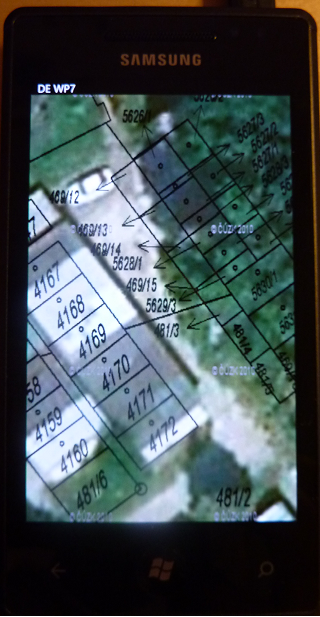
Windows Phone 7 and WMS test

  Update #1  13/03/2013, here is new  blog about Tiled WMS overlay for Windows Phone 8 :http://blog.sumbera.com/2013/03/10/tiled-wms-overlay-in-windows-phone-8/

I have quickly tested my new Windows Phone 7 (Samsung Omnia) device with the Czech cadastral map WMS overlay over the BingMaps and DeepEarth (also see this blog here: http://blog.sumbera.com/2010/11/10/wms-overlay-on-bing-maps-vs-deepearth-on-wp7/) . if you are familiar with www.ikatastr.cz and iPhone version of it (iKatastr) than this example is using same data sources.

In short : it was a great experience – WP7 was smoothly  registered, automaticaly connected to internet even without  a SIM card using USB cable and Visual Studio 2010 integration just works perfect (so far:) In comparison to many difficulties and ‘certification hell’ on iPhone this is a great relief. Now giving the fact that Nokia is going to support and develop Windows Phone 7, great user experience with WP7 and (for me and menay others) great development experience, this might change the mobile landscape significantly over the 1 or 2 years.

Update #2 Reviewing this after 2 years (March / 2013), –  something went wrong with this estimation, but do you remember Gartner predictions from that time ? for example here : http://www.globalnerdy.com/2012/05/07/the-windows-phone-predictions-that-idc-gartner-and-pyramid-research-probably-hope-youve-forgotten/

I will guess here that WP7 platform will exceed number of iPhone applications in less than 2 years.  

but we are not yet in 2015, so we will see.

Update #3 02/2016 : this estimation was completely  wrong , Windows Phone platform is nowhere, looks like great lesson learned – even you own great language and framework (C# and .NET) there is nothing that guarantees you being successful on emerging/disruptive platform/form factor. Objective-C (then Swift) or Java on Android got this mobile cake.

XenApp6 trial installation troubles notes

Here are few notes on installing XenApp6 on Window Server 2008 R2 .

-1 used guide : http://www.danieletosatto.com/wp-content/uploads/2010/04/howto_install_configure_xenapp6_server_with_webinterface_license_server.pdf

0. I had troubles with IIS not able to start, installing IIS roles before XenApp6 solved the problem

1. follow the guide until “License Server Configuration” screen, I havn’t used XML Service IIS integration (as using this in my previous attempt coused IIS troubles mentioned in step 0.

2.  generate trial license : http://carlwebster.com/blogs/webster/archive/2009/01/03/Learning-the-Basics-of-XenApp-5-for-Windows-Server-2008-Part-1-of-7.aspx

3. upload license to the XenApp 6 here : http://zenapp.blogspot.com/2010/04/installing-xenapp-6-part-3-citrix.html

4.configure XenApp6. (continue with the guide in #-1)

5. Publish application

6. in Citrix Web Interface Management create new XenAppService Site -> this will create PNAgent

7. Donwloaded client plug-in 12 for windows 64 bits

8. Manualy set up script folder  http://support.citrix.com/article/CTX125107

9. Changed the pool for Script (CtxScriptPool) to enable to run 32bit applications http://forums.citrix.com/thread.jspa?messageID=1531112

10. Citrix plug-in client (finally) works

11. Changed the pool for Script (CtxAdminPool) to enable to run 32bit applications (WI now works too  used the standard port 80)

Android vs iPhone development

this is interesting comparison of OS versions runing on Android and iOS and ‘developer friendly environments’ from the SDK perspective:

“The number of devices per OS is a great marketing number for Google and Apple to fight over but as a developer—who wants to get the most out of the SDK—I care about the version of the OS on the devices. If I want to use the latest and greatest SDK’s I’ll take Apple’s 80% of 21% over Google’s 30% of 28%.”

http://jeffreysambells.com/posts/2010/05/20/android-vs-iphone-development-decisions


“The iPhone has another big advantage and it solves the problem of distribution as I alluded to earlier. iPhone users use iTunes to sync their devices and add content. The process of syncing the device also checks for updates and allows all iPhone OS devices (iPhones, iPod Touches, iPads) to download the latests version of the OS. As a result the March 2010 iPhone Platform Versions stats look very developer friendly”


“More than 50% of the Android install base is still using version 1.6 or less. As a developer what should I do? If I choose to take advantage of the latest and greatest SDK I get less than half of the devices! But still, the bigger problem is there is no clear and easy upgrade path for those bottom 50% to get the newer OS version”

Android vs iPhone development

this is interesting comparison of OS versions runing on Android and iOS and ‘developer friendly environments’ from the SDK perspective:

“The number of devices per OS is a great marketing number for Google and Apple to fight over but as a developer—who wants to get the most out of the SDK—I care about the version of the OS on the devices. If I want to use the latest and greatest SDK’s I’ll take Apple’s 80% of 21% over Google’s 30% of 28%.”

http://jeffreysambells.com/posts/2010/05/20/android-vs-iphone-development-decisions


“The iPhone has another big advantage and it solves the problem of distribution as I alluded to earlier. iPhone users use iTunes to sync their devices and add content. The process of syncing the device also checks for updates and allows all iPhone OS devices (iPhones, iPod Touches, iPads) to download the latests version of the OS. As a result the March 2010 iPhone Platform Versions stats look very developer friendly”


“More than 50% of the Android install base is still using version 1.6 or less. As a developer what should I do? If I choose to take advantage of the latest and greatest SDK I get less than half of the devices! But still, the bigger problem is there is no clear and easy upgrade path for those bottom 50% to get the newer OS version”

SVG map sample and Canavas in OpenLayers

Update August 2015: check “scaled”- based fast SVG rendering on top of Leaflet here

Updated May 2014: check leaflet Canvas test here, SVG with d3 here   and WebGL here

Canvas map sample.

Thesis on Canvas and Open Layers (August 2010) “Evaluation of HTML5 for its Use in the Web Mapping Client OpenLayers”

OpenLayers with Canavas  (partialy deprecated) http://trac.osgeo.org/openlayers/wiki/Future/OpenLayersWithCanvas

SVG vs Canvas comparison by Jeffrey Warren from : http://unterbahn.com/2009/08/svg-vs/

“Well, SVG doesn’t scale well to large numbers of objects, but Canvas doesn’t
scale well to large screens”

“SVG performance degrades quickly (exponentially on Safari?) in the number of
objects, but Canvas performance remains at a near-constant low. This makes
sense, since Canvas is just a bitmap buffer, while SVG has to maintain
additional references to each object that it renders. Also, though not pictured,
note that performance in clearing an SVG element also decreases in the number of
drawn objects.”

[UPDATE] PDC2010 video by Patrick Dengler : http://videoaz.microsoftpdc.com/vod/downloads/vod/CD53_PatrickDengler/CD53_PatrickDengler_PDC_WMV_High_1280x720_2500k.wmv

OpenLayers or GoogleMap v3 for mobile web app ?

[2014 January] UPDATE : new Openlayers 3 beta 1 works quite well on iPad as well as Laeflet 0.7, check post here http://blog.sumbera.com/2014/01/23/leaflet-0-7-vs-openlayers-3-beta-1-on-ios/

[2011 September] UPDATE : new Openlayers 2.11 works quite well on iPad/iPhone.

I have experimented with OpenLayers 2.9 using touch.js extension for capturing touch events from iPhone/iPad. Although stripped down version of OL is about 184KB, the performance is very bad. If you have iPhone/iPad check this experiment: http://www.sumbera.com/lab/iPhone/katastr.htm (note it will not work from desktop browser)

OL team is working on v3 of OL to be more lighter, faster even for mobile devices, see here: http://trac.osgeo.org/openlayers/wiki/three  or here : http://openlayers.org/blog/2010/06/30/openlayers-3-on-github/

Meanwhile I have tested new GoogleMaps v3 how it works on iPhone/iPad. despite few problems (stability, problems with cached tiles or disconnected JavaScirpt  to load new tiles -iPad)  it works pretty well . Check yourself this page from your mobile touch device (iPhone.iPad,Android): https://ikatastr.cz

Conclusion : Google Maps v3 wins on mobile over the Openlayers 2.9


Tiled WMS overlay in Windows Phone 7

Update 13/03/2013, here is new  blog about Tiled WMS overlay for Windows Phone 8 :http://blog.sumbera.com/2013/03/10/tiled-wms-overlay-in-windows-phone-8/

This post [http://blog.sumbera.com/2010/02/25/overlay-wms-on- google-in-silverlight-bing/ ] talked about how to overlay over the Bing maps Silverlight control Google tiles  and tiled WMS. It was quite easy to port this web sample into the Windows Phone 7 emulator. I took a smaple code from Training kit called “Ex1-TheBingMapControl” and extend it with the 2 classes : GoogleTile and WmsTile, with slight changes to the namespace using Microsoft.Phone.Controls.Maps (original for Silverlight was  Microsoft.Maps.MapControl). Then extend MainPage.XAML with :

  <my:MapTileLayer Opacity="1">
       <my:MapTileLayer.TileSources>
           <local:GoogleTile></local:GoogleTile>
               </my:MapTileLayer.TileSources>
                   </my:MapTileLayer>
                    <my:MapTileLayer Opacity="1">
                        <my:MapTileLayer.TileSources>
                            <local:WMSTiledOverlay></local:WMSTiledOverlay>
                        </my:MapTileLayer.TileSources>
                   </my:MapTileLayer>

Extended sample code availabel for download here : http://www.sumbera.com/lab/WP7/TheBingMapControlWithWMSandGoogle.zip

Update: I found the way calculating BoundingBox from the quadkey somehow limiting (the DeepEarth weay) since it worked only till the level 18. So here is updated class fro getting correct bounding box of the tiled WMS request in the Bing Silverlight control:

   public WMSTiledOverlay()
: base(@"http://mapserver-slp.mendelu.cz/cgi-bin/mapserv?map=/var/local/slp/krtinyWMS.map&REQUEST=GetMap&SERVICE=wms&VERSION=1.1.1&SRS=EPSG:4326&WIDTH={4}&HEIGHT={4}&FORMAT=image/png&BBOX={0},{1},{2},{3}&LAYERS=hm2003&Transparent=true"){}
            public static double TileToWorldPosX(double tile_x, int zoom) {
return  (float)((tile_x / Math.Pow(2.0, zoom) * 360.0) - 180.0);
}
public static double TileToWorldPosY( double tile_y, int zoom) {
double n = Math.PI - ((2.0 * Math.PI * tile_y) / Math.Pow(2.0, zoom));
return   (float)(180.0 / Math.PI * Math.Atan(Math.Sinh(n)));
}
public override Uri GetUri(int tilePositionX, int tilePositionY, int tileLevel) {
                int zoom = tileLevel; //SSU tileLevel would be same as zoom in Bing control
double deltaX = 0;// 0.00135; //SSU deltaX for SLP WMS
double deltaY = 0;// 0.00058; //SSU deltaY for SLP WMS
double minXLon = TileToWorldPosX(tilePositionX, zoom) + deltaX;
double minYLat = TileToWorldPosY(tilePositionY + 1, zoom) + deltaY;
double maxXLon = TileToWorldPosX(tilePositionX + 1, zoom) + deltaX;
double maxYLat = TileToWorldPosY(tilePositionY, zoom) + deltaY;
string wmsUrl = string.Format(this.UriFormat, minXLon, minYLat, maxXLon, maxYLat, 256);
return new Uri(wmsUrl);
}}
   

Tiled WMS overlay on Google Map v3

this is the third sample of the tiled WMS overlay over the Spherical Mercator, this time over the new Google Map v3. Previsous post talked about overlyaing WMS in   OpenLayers (http://blog.sumbera.com/2010/02/17/overlay-wms-on-google-in-openlayers/).

Sample application can be found here: http://www.sumbera.com/lab/GoogleV3/tiledWMSoverlayGoogleV3.htm You can try to run it on your mobile device as well – suprisingly it run very well on my iPhone (sometimes it just crash Safari :), however on the iPad there are some more serious issues that will be hopefuly resolved with new iOS update (JavaScript stops to run).

For the new Google Map v3 you have to do the following :

//Define custom WMS tiled layer

var SLPLayer = 
 new google.maps.ImageMapType (
 {
  getTileUrl:
    function (coord, zoom) { 
      var proj = map.getProjection(); 
      var zfactor = Math.pow(2, zoom); 
       // get Long Lat coordinates
      var top = proj.fromPointToLatLng(
             new google.maps.Point(coord.x * 256 / zfactor, coord.y * 256 / zfactor) ); 
      var bot = proj.fromPointToLatLng(
            new google.maps.Point((coord.x + 1) * 256 / zfactor, (coord.y + 1) * 256 / zfactor)); 
      //corrections for the slight shift of the SLP (mapserver)
       var deltaX = 0.0013; 
       var deltaY = 0.00058; 
      
      //create the Bounding box string
       var bbox = (top.lng() + deltaX) + "," +(bot.lat() + deltaY) +","
                           +(bot.lng() + deltaX) +"," +(top.lat() + deltaY);
      
       //base WMS URL
        var url = 
       "http://mapserver-slp.mendelu.cz/cgi-bin/mapserv?map=/var/local/slp/krtinyWMS.map&" ;
       url +="&REQUEST=GetMap"; //WMS operation
       url +="&SERVICE=WMS"; //WMS service
       url +="&VERSION=1.1.1"; //WMS version 
       url +="&LAYERS=" + "typologie,hm2003"; //WMS layers
       url +="&FORMAT=image/png"; //WMS format
       url +="&BGCOLOR=0xFFFFFF" ;
       url +="&TRANSPARENT=TRUE" ;
       url +="&SRS=EPSG:4326"; //set WGS84 
       url +="&BBOX="+ bbox; // set bounding box
       url +="&WIDTH=256"; //tile size in google
       url +="&HEIGHT=256" ; 
       return url; // return URL for the tile    
     }, //getTileURL

 tileSize: new google.maps.Size(256, 256),
 isPng: true
 });
//add WMS layer
 map.overlayMapTypes.push(SLPLayer); 

iKatastr / MapShake

Poznamka 2018:  tohle je archivni blog o tom, z ceho vznikl iKatastr – byl to vlastne   derivat (vygenerovana mapa) jinak neuspesneho  projektu MapShake.czScreen Shot 2018-10-02 at 6.09.41 PM

iKatastr enables to view cadastral information in Czech Republic and view the owner of the parcel/building.  I would like to mention here few technical details – iKatastr is actually less programmed but more configured. iKatastr on mobile uses Universal Map Format that defines the data sources for map composition and the query request when tapping on-screen. iKatastr in web do the same thing, it uses JSON definition to read full map composition. Moreover web version is linked with MapShake where the configuration of the map can be authored, verified, shared with friends and even you can generate your own iKatastr map as HTML page. the map you see on www.ikatastr.cz is the same that is stored on Mapshake here : http://www.mapshake.cz/549-iKatastr . To generate map similar to www.ikatastr.cz you need to press the <html> button   in the lower left corner to get this page: http://www.mapshake.cz/mapjs.aspx?i=549 from where you can copy/paste the full JavaScript stack to regenerate map on your side.  In the generated map you can also find this linked JavaScript : http://www.mapshake.cz/mi/549.js that is used  by www.ikatastr.cz.

So the bottom line is : do not programme, rather  generate / configure your maps !