Category Archives: Uncategorized

Tiled WMS overlay in Windows Phone 8

WP8WMSUpdate May 2014: version for Windows Phone 8.1 is here: http://blog.sumbera.com/2014/05/23/wms-overlay-on-windows-8-1-and-windows-phone-8-1/ 

Looking on Windows Phone 8 Map SDK, I have tried to migrate a simple WMS overlay from Windows   Phone 7 (Bing map) – blogged here : http://blog.sumbera.com/2010/11/07/tiled-wms-overlay-in-windows-phone-7/

Changes :

– for migration you have to add before migration System.Core into the project (had to edit manualy proj file and add it there)

-Change from *.Controls.Map to *Map.Controls

– XAML definition

 <maps:Map x:Name="sampleMap"
 LandmarksEnabled="False"
 Loaded="sampleMap_Loaded"
 CartographicMode="Hybrid"                    
 Center="49.320574,16.68942"
 ZoomLevel="14" />

Loading TileSource:

private void sampleMap_Loaded(object sender, RoutedEventArgs e)
{
MapsSettings.ApplicationContext.ApplicationId = "<applicationid>";
MapsSettings.ApplicationContext.AuthenticationToken = "<authenticationtoken>";
TileSource wmsTileSource = new WMSTile();
sampleMap.TileSources.Add(wmsTileSource);
}

..then in your TileSource you can use as usual your method GetUri.

Sample code based on Microsoft Sample can be downloaded here: www.sumbera.com/lab/WP8/WMSonWP8.zip

Link

Back to the feature phone

Samsung


reverted to feature phone after 5 years of iPhone addiction. Here is my new phone. Great features:

– no more reading and responding to  emails in my  private time

– no more reading flipboard (tech crunch, CNET..)

– looking forward for the next day email surprises

– smaller and lighter than iPhone 5 or 6 🙂

-no more twitter (btw. I have removed all my tweets and followers, sorry my flowers…, left only linkedIn and wordpress)

– killing feature : battery life up to several days

– very fast, focus on 3 single tasks done: phone  , sms , alarm

– absolute differentiation from all touch-based phones

– 5 Mpix camera as on my last iPhone (4) with autofocus

-supports USB mass storage and microSD card

– price : 90 USD

🙂

nice article back to feature phones

WMS overlay in iOS MapKit

update May 2014: iOS7 version and notes available here: http://blog.sumbera.com/2014/05/17/wms-on-mapkit-with-ios7/


I have crafted really simple and quick code at ESA App dev camp for viewing WMS sources.  And as few people questioned  me on  how to do this, I am posting the full code of the MapView component that takes sample WMS service (Ozone) and overlays this above MapKit.

In github here : https://github.com/Sumbera/WMSoverMapKit

you will find MapViewController that accepts  WMS  sources stored as array with BBOX %f, %f, %f, %f

-(void) addWMSOverlays: (NSArray*) overlays

this can be called from your rootController:

MapViewController * mapViewController = [[MapViewController alloc] init];
 
WMSOverlay * wmsOverlay =[[WMSOverlay alloc]
 initWithName:@"Ozone" Url:@"http://wdc.dlr.de/ogc/produkt_t?LAYERS=GOME2_O3&
 TRANSPARENT=TRUE&
 FORMAT=image/png&
 STYLES=&
 SLD=http%3A%2F%2Fwdc.dlr.de%2Fsld%2FGOME2_O3_sld.xml&
 TIME=2012-02-12T00:00:00Z&
 SERVICE=WMS&
 VERSION=1.1.1&
 REQUEST=GetMap&
 SRS=EPSG:4326&
 WIDTH=256&
 HEIGHT=256" 
 Opacity:0.5];
  [mapViewController  addWMSOverlays:[NSArray arrayWithObjects:wmsOverlay, nil]];

please note:

#1. that sample code uses experimentaly MKNetworkKit, which has some occasional troubles. You can replace the download method in WMSOverlayView  class downloadTile

#2 it uses simple hash for storing tiles on cache.

enjoy

ESA App challenge winner

  I have participated in the first ESA (European Space Agency)  app dev challenge where 5 teams competed on best  concept/prototype that will bring GMES data sources to the public on mobile devices. Our team (Czech Republic, Germany, Macedonia) won and each member got iPad 3 . We won not because we were best in terms of  the best prototype,  concept or presentation, but because we fit best to the criteria imposed by this challenge and each piece of delivery (5 page long document describing concept, presentation, prototype demo)  was pretty good and simple enough to be feasible for final realization. Moreover a unique value of mobile devices plus unique value of  GMES satellites have been addressed.  Full article can be read here :   http://www.esa.int/esaEO/SEMIQOBXH3H_index_0.html

Update 08/08/2012 : there is also press release from my company  Intergraph : http://www.intergraph.com/assets/pressreleases/2012/08-01-2012.aspx


MapKit optimization

  1. MKMapRect and CGRect are the same !
  2. MapKit sends duplicate requests for CanDraw. Duplication found is 10 of 20 tiles (full iPad screen) are sent twice. Very interesting is that  drawRect in base map does that too (duplicated request is sent from the second running thread )
  3. MapKit is using CATiledLayer underneath
  4. Don’t do copy-paste 2 loops (see MapTile WWDC 2010 sample project from Apple) if your tiles fits exactly to the matrix of the Google tiles

// for (NSInteger x = minX; x < = maxX; x++) {{
//for (NSInteger y = minY; y < = maxY; y++) }}

Skylight UI for SONAR X1 – inspiration for geospatial desktops

This might be of your interest to see  how music production software solved the UI for many controls and options the user might want to control at the same (real!) time.   SONAR X1 actually haven’t brought any new functionality in this new version, just completely redesigned UI and build on top of this marketing campaign. Another fact I like is that they haven’t use all these fancy styles on windows that makes things look ‘nice’ like powerpoint but are not well readable or effective for eyes. To me it is kind of mixture of VisualStudio 2010 UI plus Office Ribbon bar plus good color scheme and additional tweaks to make it really usable.

watch the video here: http://www.youtube.com/watch?v=97LnrViar38

Windows Phone 7 and WMS test

  Update #1  13/03/2013, here is new  blog about Tiled WMS overlay for Windows Phone 8 :http://blog.sumbera.com/2013/03/10/tiled-wms-overlay-in-windows-phone-8/

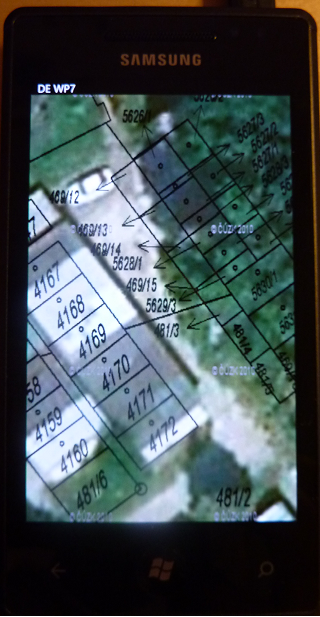
I have quickly tested my new Windows Phone 7 (Samsung Omnia) device with the Czech cadastral map WMS overlay over the BingMaps and DeepEarth (also see this blog here: http://blog.sumbera.com/2010/11/10/wms-overlay-on-bing-maps-vs-deepearth-on-wp7/) . if you are familiar with www.ikatastr.cz and iPhone version of it (iKatastr) than this example is using same data sources.

In short : it was a great experience – WP7 was smoothly  registered, automaticaly connected to internet even without  a SIM card using USB cable and Visual Studio 2010 integration just works perfect (so far:) In comparison to many difficulties and ‘certification hell’ on iPhone this is a great relief. Now giving the fact that Nokia is going to support and develop Windows Phone 7, great user experience with WP7 and (for me and menay others) great development experience, this might change the mobile landscape significantly over the 1 or 2 years.

Update #2 Reviewing this after 2 years (March / 2013), –  something went wrong with this estimation, but do you remember Gartner predictions from that time ? for example here : http://www.globalnerdy.com/2012/05/07/the-windows-phone-predictions-that-idc-gartner-and-pyramid-research-probably-hope-youve-forgotten/

I will guess here that WP7 platform will exceed number of iPhone applications in less than 2 years.  

but we are not yet in 2015, so we will see.

Update #3 02/2016 : this estimation was completely  wrong , Windows Phone platform is nowhere, looks like great lesson learned – even you own great language and framework (C# and .NET) there is nothing that guarantees you being successful on emerging/disruptive platform/form factor. Objective-C (then Swift) or Java on Android got this mobile cake.

Apple-like image carousel for Microsoft Power Point

***updated 02/2011 : Power Point 2010 includes lot of out-of-box nice animation – they are part of the Transitions effects, including “slide carousel” so you do not need to use below procedure unless you want to have glass reflection that ppt 2010 doesn’t provide in its default transitions “orbit” and “doors”.***

here is the ultimate Power Point “technology” that I have used in my previous blog for animation of pictures (check here: http://blog.sumbera.com/2009/06/15/whatevermap-alpha/ ). Yes ! it is just powerpoint animated and captured by video capture software. I believe you might find this useful too  when you need to present multiple screenshots (and impress audience)  with your cool image  carousel . You can easily customize it and use for your own presentations. Each image is self contained animation so you can copy/paste/change picture and possible sync by mouse clicking.  But deafult is that each image is waiting for cca 2 seconds in the front and then fade out and zoom out from the screen (while the next one is zooming in an fading-out)
In the following ‘image carousel pptx’  you can change images  by right clicking on any image and selecting “change picture” menu option.

http://www.sumbera.com/blog/ImageCarouselPowerPoint.pptx