Summary: Paper describes how to spy MDL built-in functions with help of Microsoft’s research project called Detour (a binary interception of functions). Enhanced code is available on request…
Downloads: traceapi.zip (source and sample)
Introduction
Programming MDL means sometimes tough time in debug. Sometimes you need to monitor particular function, or sequence of functions and see where this or that memory was allocated or released. Microsoft researches came with tool called Detour – a binary interception of functions. I got idea to test it on MicroStation built-in functions to see how Detour can help MDL developers. Please, read carefully following pages, if you are interested, cause I suppose in this short paper that you know how detours works. http://research.microsoft.com/sn/detours/
How to make the sample work
download traceapi.zip and extract all files to arbitrary folder. you will get TRACEAPI folder with directories bin, inc, lib etc..go to the bin directory and..
1. copy executable files (syelogd.exe, traceapi.dll, withdll.dll,testApi.bat)
from bin directory into MSv8 path (e.g d:\bentleyv8\program\MicroStation)
2. start command prompt and run syelogd.exe – the program will wait for messages
passed from detour:

3. start MS DevShel and inject traceapi.dll into MicroStation process with help of withdll.exe utility:

4. in MicroStation open for instance from menu Settings/manage dialog box and see what have been traced in syelogd process:
note that in code only these functions are traced for this sample:
API_TRACE_DO(mdlDialog_open);
API_TRACE_DO(mdlDialog_openAdvisoryBox);
API_TRACE_DO(mdlDialog_openAlert);
API_TRACE_DO(mdlDialog_openAlertById);
API_TRACE_DO(mdlDialog_openCompletionBar);
API_TRACE_DO(mdlDialog_openInfoBox);
API_TRACE_DO(mdlDialog_openInfoBoxOptional);
API_TRACE_DO(mdlDialog_openMessageBox);
API_TRACE_DO(mdlDialog_openModal);
API_TRACE_DO(mdlDialog_openModalWithMD);
API_TRACE_DO(mdlDialog_openModalWithMDAndBsiDataP);
API_TRACE_DO(mdlDialog_openOKCancelBoxOptional);
API_TRACE_DO(mdlDialog_openPalette);
API_TRACE_DO(mdlDialog_openWithDBQuery);
API_TRACE_DO(mdlDialog_openWithMD);
..but you may extend them….with code modification
5. open VisualStudio project tr.dsw and add your custom function into file
_mdlv8.cpp. This can be done in two ways either Detour’s verbose way with detail list
of all parameters and your custom condition for displaying output
or by extended simplified way with macros API_TRACE_DEC and API_TRACE_DO
enjoy it !
following is brief info how Detour works and what have been modified….
Original Detour steps
Originally Detour needs several definitions to get inside the specified API function, let’s look on subclassing mdlElmdscr_freeAll function:
1. first define maping between real function and original DLL API function
DETOUR_TRAMPOLINE(int Real_mdlElmdscr_freeAll(MSElementDescr **elmDscrPP),mdlElmdscr_freeAll);
2. Define *user hook* function from which original function will be called. This function is jumped from code inserted in front of the original DLL function. When any application call MDL built-in function mdlElmdscr_freeAll, the jump instruction cause redirection into your user function, see fig. bellow:
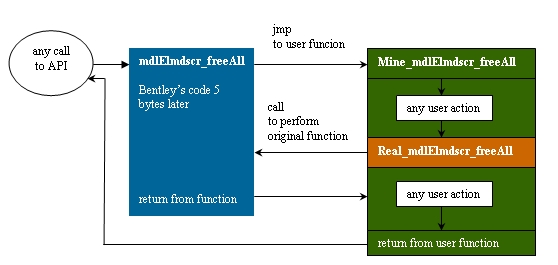
int Mine_mdlElmdscr_freeAll(MSElementDescr **elmDscrPP)
{
int type=0;
if (*elmDscrPP)
type = (*elmDscrPP)->el.ehdr.type;
if (type == 4){
_PrintEnter("LINE : mdlElmdscr_freeAll(%lx)\n", *elmDscrPP);
}
int rv = 0;
__try {
rv = Real_mdlElmdscr_freeAll(elmDscrPP);
} __finally {
if (type == 4){
_PrintExit("LINE :mdlElmdscr_freeAll() <- %lx\n", rv);
}
};
return rv;
}
4. last step is to inject code and set which user function will be used
DetourFunctionWithTrampoline((PBYTE)Real_mdlElmdscr_freeAll,(PBYTE)Mine_mdlElmdscr_freeAll);
As you may see, you have to write several lines of code, unfortunatelly…Anyhow this approach is good, if you need only several function to monitor, if you need to change one function or like this. But if you need to spy hundreds or thousands MDL built-in functions, then you may got trouble with definition and declaration of all these functions. How to deal with this ? I decided to little bit enhance Detour with capability if spying dll functions without knowledge of its parameters (or if you do not need to monitor them). And this was good chance to remember Assembler.
There are several problems:
– you need to somehow save all parameters,
– you need to save all registry,
– you cannot influence current stack frame of the function,
– you need take care of threads.
– But still it would be nice to print some values of function parameters –at least in hex format
Enhancement of Detour:
These functions performs second stack push and pop operation to save state of stack.
#define STACK_FRAME_SIZE 0x38//0x78 for debug
VOID _push (VOID){
DWORD *threadStackP = (DWORD*)TlsGetValue(s_nTlsStack)+ sizeof(DWORD);
_asm mov edx,dword ptr [threadStackP]
_asm mov ecx,[esp+STACK_FRAME_SIZE]
_asm mov [edx],ecx
TlsSetValue(s_nTlsStack,threadStackP );
}
VOID _pop(VOID){
DWORD *threadStackP = (DWORD*) TlsGetValue(s_nTlsStack);
_asm mov ecx,dword ptr [threadStackP]
_asm mov edx,dword ptr [ecx]
_asm mov [esp+STACK_FRAME_SIZE+0x4],edx
TlsSetValue(s_nTlsStack,threadStackP-sizeof(DWORD));
}
this is macro for automatic declaration of user hook function with
printing of parameters
__declspec(naked) Mineg_##target() \
{ \
__asm { pushad };\
_push();\
__asm { popad };\
__asm { add esp,4};\
__asm { pushad };\
__asm { push[esp+0x24]};\
__asm { push[esp+0x28]};\
__asm { push[esp+0x28]};\
__asm { push[esp+0x3C]};\
_PrintEnter("%s -->%08lx \t (%s) \t %08lx \t (%s) \n",#target);\
__asm { add esp,16};\
__asm { popad };\
__asm { call Realg_##target };\
__asm { push 0xFFFFFFFF};\
__asm { pushad };\
__asm { push eax };\
_pop();\
_PrintExit("%s <--- %lx\n",#target);\
__asm { pop eax };\
__asm { popad };\
__asm { ret };\
}
#define API_TRACE_DO(func) \
DetourFunctionWithTrampoline((PBYTE)Realg_##func,(PBYTE)Mineg_##func);
so how it works now ?
you need only 2 lines to get into API function :
//declaration:
API_TRACE_DEC(mdlElmdscr_freeAll);
//definition
API_TRACE_DO(mdlElmdscr_freeAll);
morover I have extended utility RELIEFe (RELIEF exports) which generates from Microstation dll these two lines for each exported function, so the final task is only copy-paste and compile…and enjoy.
here is example of spying of mdlDialog_callFunction with print of calling MDL task. The number on the left is thread number in MicroStation process.
001 mdlDialog_callFunction MDLPROJ ret: 60c1c2cb
001 mdlDialog_callFunction MDLCACHE ret: 60c1c2cb
001 mdlDialog_callFunction ret 60c1c2cb<-
001 mdlDialog_callFunction MDLCACHE ret: 60c1c2cb
001 mdlDialog_callFunction MDLPROJ ret: 60c1c2cb
001 mdlDialog_callFunction MDLPROJ ret: 60c1c2cb
001 mdlDialog_callFunction ret 60c1c2cb<-
001 mdlDialog_callFunction MDLPROJ ret: 60c1c2cb
001 mdlDialog_callFunction ret 60c1c2cb<-
001 mdlDialog_callFunction RELIEF ret: 60c1c2cb
001 mdlDialog_callFunction ret 60c1c2cb<-
001 mdlDialog_callFunction RELIEF ret: 60c1c2cb
001 mdlDialog_callFunction ret 60c1c2cb<-
001 mdlDialog_callFunction RELIEF ret: 60c1c2cb
001 mdlDialog_callFunction ret 60c1c2cb<-
001 mdlDialog_callFunction MDLPROJ ret: 60c1c2cb
001 mdlDialog_callFunction ret 60c1c2cb<-
001 mdlDialog_callFunction MDLPROJ ret: 60c1c2cb
001 mdlDialog_callFunction ret 60c1c2cb<-
001 mdlDialog_callFunction SUNANGLE ret: 60c1c2cb
001 mdlDialog_callFunction ret 60c1c2cb<-
001 mdlDialog_callFunction SUNANGLE ret: 60c1c2cb
001 mdlDialog_callFunction ret 60c1c2cb<-
001 mdlDialog_callFunction SUNANGLE ret: 60c1c2cb
001 mdlDialog_callFunction ret 60c1c2cb<-
Final words
I would say, DETOUR is cool, you may intercept nearly any MDL built in function. With enhancement I presented above, you may easily customize code for huge amount of functions (but I would recommend you not to do this, because it naturally slow down MicroStaiton performance) good approach is to take for instance particular area of function, let’s say Window function and see what is going on behind the scene.another utilization of the detour can be in subclassing or changing behavior of MDL API function (may be temporarily), or you may dynamically prohibit execution of the function you don’t like…

